
When a purchase or fund addition is flagged for review, we need to confirm that you indeed initiated the transaction. To do this, we generate a 4-character verification code that shows up in your credit/debit card statement.
What Is The 4-character Verification Code?
The 4-character verification code confirms that you have access to the payment method used to complete your purchase.
You will usually find it on your bank or card statement when viewing the details of the Gameflip charge. The code appears as the last four letters of the charge description.
For example:
If the charge appears as BLSiJJi##-ABCD, then the verification code is ABCD.
Here’s how to find it and complete the verification:
Credit/Debit Card Verification
- Access Your Statement: Log in to the online portal for the credit card or bank account you used for the transaction.
- Locate the Code: Look in your account Activity or Statements section. The 4-character code will appear in your statement, in front of the item’s name from Gameflip.
- If the Code doesn’t appear: The fund transaction is still processing, so your account might not be charged yet. The code might take a few hours to show up, depending on your bank.
It’s important to only provide the exact 4-character code requested. Please do not send your CVV or any other credit/debit card details.
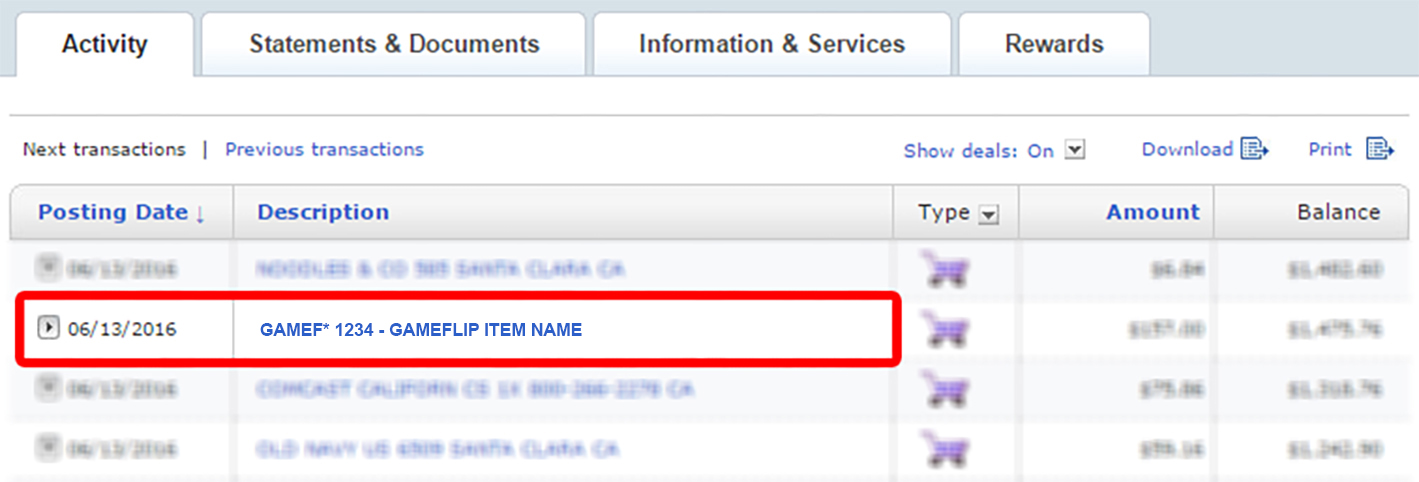
Please note that this step helps confirm you own the credit/debit card and account being used, which helps keep transactions secure and authorized.
If you fail the verification:
- Future purchases may be marked “Under Review” until a Gameflip team member reaches out.
- You will have a limited window—a few hours—to enter the code before the purchase may be canceled.
- This step helps confirm you own the credit/debit card and account being used, which helps keep transactions secure and authorized.
If you need help finding the code on your statement or if it’s not appearing at all, feel free to contact Gameflip Support.
Comments
0 comments
Article is closed for comments.