
Redeeming a PlayStation Network (PSN) code is quick and simple. You can activate your code directly from your PlayStation console or through a web browser. Just follow the steps below for your preferred method.
On Your PlayStation Console
- Sign in or create your account
Log in to your Sony Entertainment Network (PSN) account. - Go to the PlayStation Store
From your PlayStation 5 or PlayStation 4 home screen, open the PlayStation Store icon. - Select Redeem Codes
Scroll down in the Store’s left-hand menu until you find the Redeem Codes option and select it. - Enter your code
Type in your 12-digit PSN code exactly as it appears (codes are case-sensitive). - Confirm and continue
Once entered, select Continue. If you are redeeming a trial code, you’ll be asked to agree to the Trial Code Terms of Service. After that, select Continue again to finish the redemption process.
Access your content
Once redeemed, your game, subscription, or credit will be added to your account. You can find digital games in your Library > Purchased section or view added funds in your Wallet.
Web Browser Steps
- Visit the Sony Entertainment Network account page.
- Sign in to your PSN account, or create one if you don’t already have it.
- Find and select Redeem Prepaid Card under the Account or Payment options.
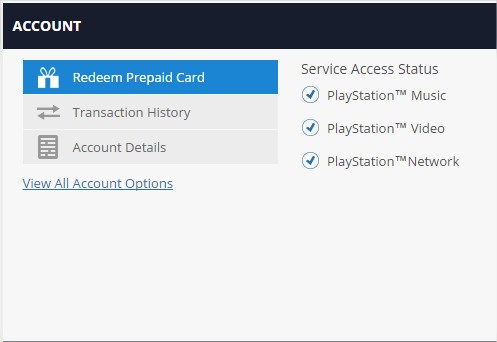
- Enter your 12-digit code exactly as shown.
- Click Continue to redeem your code and apply the credit or item to your account.
Comments
0 comments
Article is closed for comments.