
Here’s a simple step-by-step guide to help you activate your Uplay code and get playing as soon as possible.
Step 1 – Launch Ubisoft Connect (Uplay)
Open the Ubisoft Connect (formerly Uplay) desktop application and log into the account where you want the game to appear.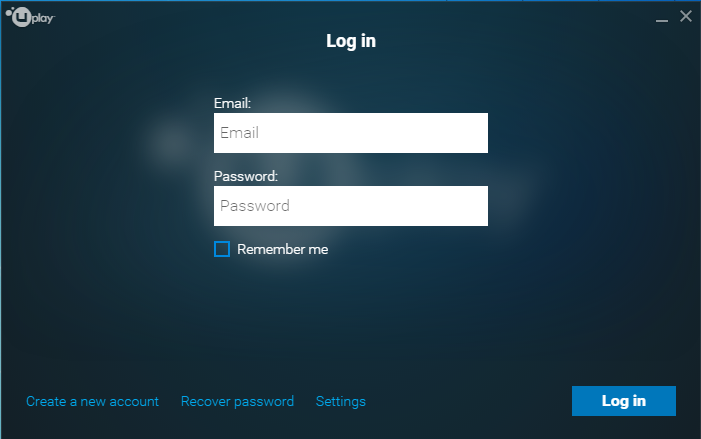
Step 2 – Activate the Code
Click the “Activate Product” icon (it looks like a game controller) located in the header of the Uplay app.
Enter the code you received from Gameflip, then click the Activate button at the bottom right of the dialog.
Step 3 – Enjoy Your Game
Once the code is accepted, the game or content will be added to your Ubisoft Connect library and is ready to install or play.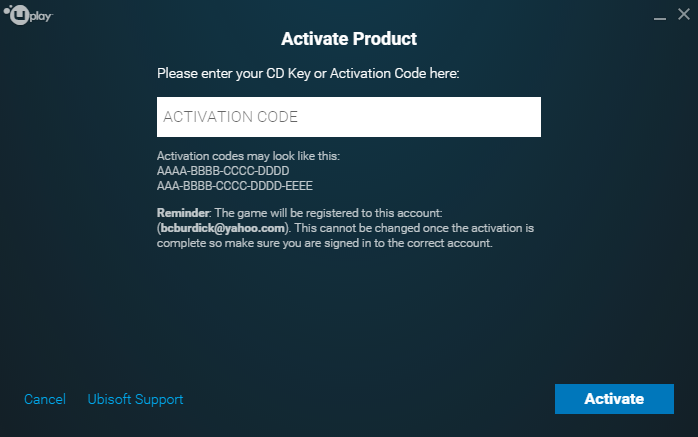
Troubleshooting
- Make sure you’re logged into the correct Ubisoft Connect account, and that it matches the region listed in your Gameflip purchase.
- Ensure the code was entered exactly—no extra spaces or missing characters.
- If you receive an error, double-check that the content is compatible with your account and applicable region.
Comments
0 comments
Article is closed for comments.